Export from Editor
The process is completely the same as Thunderstore, except during export, use the Export Thunderstore .zip Package button.
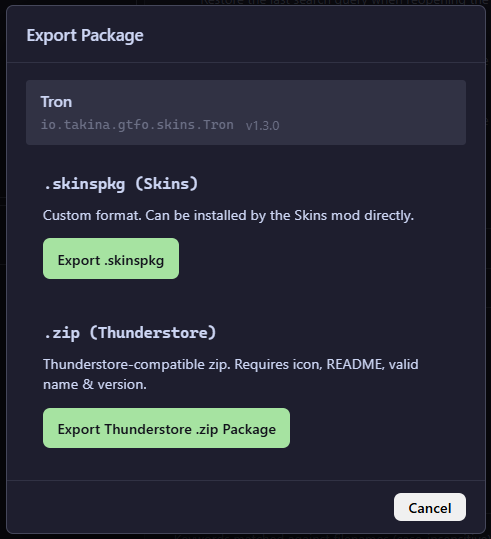
Now, save the zip file and either upload it to Thunderstore or send it to someone as a regular mod.
Manual (Legacy)
If you are unfamiliar with what should be packaged for distribution, check out Legacy Documentation.
If you are not yet familiar with the requirements for packages distributed on Thunderstore, check out their documentation:
 Creating a Package | Thunderstore WikiRequirements for a valid Thunderstore packagewiki.thunderstore.io
If you are familiar with this, you are half way there.
Manifest
Since Skin Groups don’t work unless the plugin is installed, include the plugin as a dependency.
 Skins by food · GTFOModular skin support (no more replacing asset files!)thunderstore.io
You should use the dependency string with the latest version, though this is not future proof since the this plugin might update.
Info
Some mod managers don’t respect the version number anyways. e.g. r2modman
Here’s the Tron skin pack’s manifest.json as an example. There are no other requirements for the manifest with respect to Skins.
{
  "name": "Tron",
  "version_number": "1.1.0",
  "website_url": "",
  "description": "A bunch of skins inspired by Tron",
  "dependencies": [
    "food-Skins-0.6.0"
  ]
}
Asset Folder
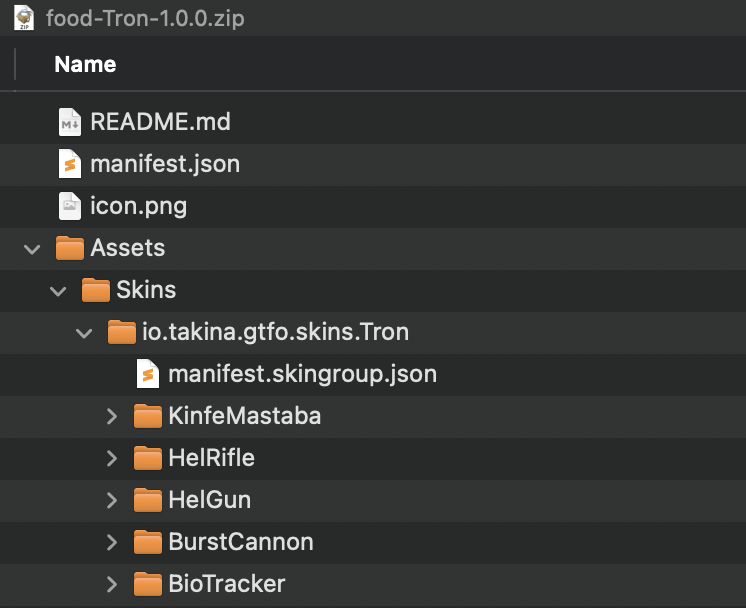
After setting up the required structure for a Thunderstore package, simply create the directories for Assets/Skins/ within the archive.
Warning
As a reminder. Please use sufficiently unique and meaningful GUIDs for your Skin Groups!
After which, copy all the Skin Group folders (must be the folders themselves) into the Skins folder here.
This works because once the package is installed, the contents inside Assets/ will be copied to <BepInEx>/Assets which is the per-profile skins folder.
As an example, the following is the package structure for the Tron skin pack on Thunderstore.